 SimplyHealth
 Blog
How to Organize an Aging Parent's Care in One Place
The short answer: Most families track a parent's care across a group text, a shared calendar, paper notes and phone calls. Nothing connects them, so updates get missed and the same questions keep coming up. The fix is one shared page that holds the schedule, medications, readings and to-dos, and that everyone helping can see.
I'm Tom, the founder of SimplyHealth. While building the SimplyHealth care team, I kept hearing a version of the same sentence from families: "Mom's care lives in a group text, a Google Calendar, and a notebook on the kitchen counter."
This guide walks through why that setup breaks down, what belongs on a single care page, and how to set one up for your family this week, with or without our app.
Where a parent's care lives today (and why it breaks)
In most families, care information is split across six places. Each one works fine by itself. The trouble is that none of them talk to each other.
| Where it lives | What it holds | What goes wrong |
|---|---|---|
| Group text | Quick updates, "Did anyone call the pharmacy?" | Important details get buried under dozens of messages |
| Shared calendar | Doctor visits, aide shifts | Usually only one person keeps it current |
| Paper notes | Medication lists, discharge instructions | Stuck on the kitchen counter, so only whoever is in the house can see them |
| Phone calls | Updates from doctors, aides and neighbors | Nobody writes them down |
| Spreadsheet | Medications, expenses, contacts | Started with good intentions, soon out of date |
| Someone's memory | Everything else | Disappears when that person is busy, sick or away |
The result is predictable. A medication change makes it into the group text but not onto the paper list. An aide doesn't know about Thursday's appointment. One sibling ends up as the switchboard, answering the same questions over and over.
Texts aren't a care plan. They're a conversation, and conversations scroll away.
What belongs on one shared care page
A good care page answers the questions your family keeps asking, without anyone needing to text. Use this checklist to see what yours should hold.
- Schedule: appointments, aide shifts, who is driving and who is visiting
- Medications: current list, doses, timing, and any recent changes
- Readings: blood pressure, blood sugar, weight, or whatever the doctor asked you to track
- To-dos: refills, paperwork, follow-up calls, and who owns each one
- Care team: everyone helping, including family members, paid aides and key contacts
- Recent notes: what happened at the last visit and what changed
The test is simple. Could someone who just joined the care team, such as a new aide or a sibling flying in for the week, look at the page and know what's happening today? If so, it's working.
How to set up one place for your parent's care: 5 steps
- Take inventory. Spend 20 minutes collecting everything from the six places above: scroll back through the group text, photograph the paper lists, and write down what's only in someone's head.
- Pick one home for it. A shared document, a notebook app or a care team app can all work. What matters is that everyone helping can reach it from their phone and that it's the only place. Two "official" lists are worse than one.
- Invite the whole care team. Include siblings, a spouse, and paid aides. Agree that updates go on the page first and in the group text second, if at all.
- Give each to-do an owner. "Someone should call about the refill" means nobody will. Put a name next to every task.
- Make it the first place you look. Before calling a sibling with a question, check the page. After an appointment, update it within the day. A habit of checking once a day, even briefly, keeps it current.
You can do this with free tools. The catch is that a general-purpose document doesn't remind anyone of anything, and it gets messy fast. That's the gap we built the SimplyHealth care team to fill.
How the SimplyHealth care team does it, at a glance
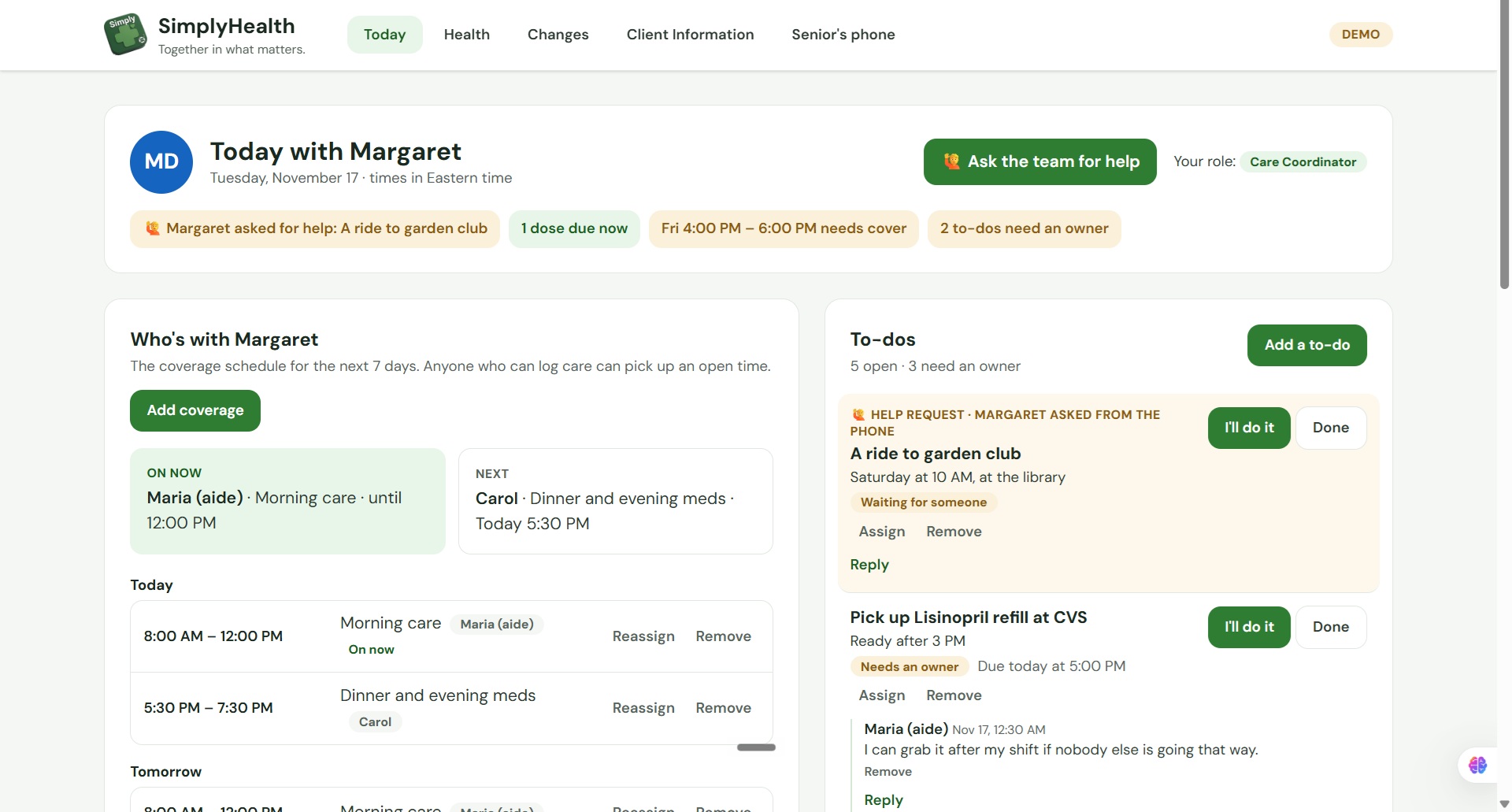
The SimplyHealth care team puts your parent's whole care picture on one page. Open it and you see today's schedule, current medications, recent readings and open to-dos, without scrolling through texts or calling around.
- One page for everyone helping. Family members and paid aides see the same information, so nobody works from an old list.
- Built around "at a glance." The page answers "What's happening with Mom today?" in a few seconds.
- Connected to your parent's app. The SimplyHealth app for seniors handles reminders on their own phone, and the care team page keeps the people helping them in the loop.
We reviewed the care team platform with early users on October 3. One reviewer called it "more than minimally viable… terrific," and the team setup needed no changes. That second part matters to me most: getting a family set up should be the easy part.
Frequently asked questions
What is a care team app? A care team app gives everyone who helps an aging parent one shared place for the schedule, medications, health readings and to-dos. It replaces the patchwork of group texts, calendars and paper notes.
Can paid aides and family use the same page? Yes. The SimplyHealth care team is built so family members and paid aides work from the same page, which means an aide sees the same medication list and schedule as the family.
Who can see my parent's information? Only the people you invite to your parent's care team.
Is there a free trial? Yes, you can try the SimplyHealth care team free for 14 days.
See your parent's care in one place
If you're the person holding your family's care together, you shouldn't have to be the switchboard too. Take a look at the SimplyHealth care team and see what one page for everyone feels like.
See the SimplyHealth care team demo
Tom, Founder, SimplyHealth (The GrowTank, LLC)
Try SimplyHealth Care Team
One page for everyone who helps. Free for 14 days, no card needed to start.